
Structure that survives Word
H1–H6 map to Word heading styles. Nested lists, GFM task lists, and strikethrough keep their meaning.
Paste a ChatGPT answer (or any Markdown) and download a clean, editable Word document — headings, lists, GFM tables, code, Mermaid diagrams, and editable LaTeX equations. Nothing is uploaded.
Applies to Download .docx (preview stays on-screen styled). Shortcut: Ctrl/⌘+Enter downloads .docx.
Pro brand template — added to .docx pages only (preview unchanged). Get Pro if locked.
Paste Markdown on the left, drop a .md file, or try a sample.
Private — nothing leaves this browser. Shortcut: Ctrl/⌘+Enter downloads .docx.
Illustrative before/after: structure becomes real headings, lists, and tables you can edit — not a flattened paste.
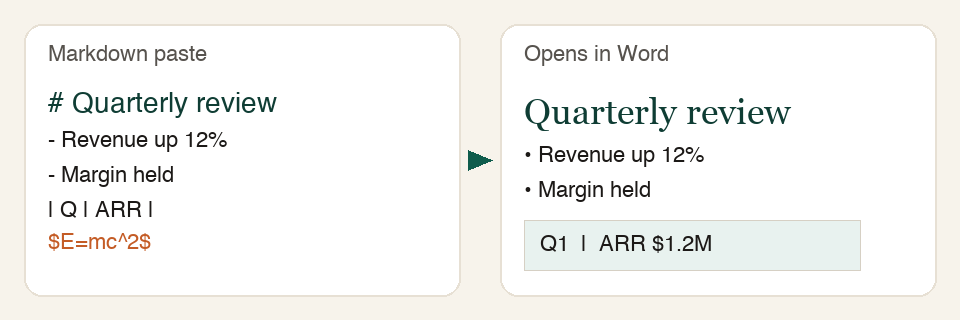
Built for real ChatGPT / Claude / Gemini / Grok answers — not a toy stripper that flattens everything to plain text.
H1–H6 map to Word heading styles. Nested lists, GFM task lists, and strikethrough keep their meaning.
GFM pipe tables become Word tables. Fenced code stays monospace with a language label when present.
Common LaTeX ($...$, \(...\), dirty ( ... )) becomes editable Word equations.
Mermaid fences render to diagram images — or keep code with an explicit note on failure.
Clipboard HTML, standalone HTML download, print-to-PDF, .md/.txt drag-drop, and local draft autosave. Nothing uploaded for conversion.
Markdown → Word runs entirely in your browser. No account, no upload, no paywall on paste → .docx. That is the product — not a trial. Pro is a one-time unlock for batch ZIP and brand presets.
Forever free
One-time unlock · no subscription
Checking payment availability…
Already paid? Restore Pro
Short answers about privacy, formatting, and how to get Markdown out of ChatGPT.
Yes — Markdown → Word conversion is free forever. No account and no paywall on paste → .docx. Optional Pro unlocks Batch ZIP and brand templates only; core conversion never requires Pro.
Pro adds Batch ZIP (many .md files → one ZIP of .docx) and brand templates (header/footer on downloads). One-time unlock. Restore with your checkout email on /restore if you switch browsers.
No. Markdown → .docx conversion runs entirely in your browser. Your content never leaves your device for conversion. See the Privacy Policy.
Headings (H1–H6), bold/italic/strikethrough/inline code, links, ordered and nested lists, GFM task lists, GFM tables as real Word tables (including column alignment), fenced code blocks (monospace + language label), Mermaid fences as diagram images (or explicit code fallback), remote images when fetch/CORS allows (otherwise alt + link), and common LaTeX math as editable Word equations (OMML). Only fragments we cannot convert get an explicit labeled note — never a silent drop.
Yes. Use Copy formatted to put HTML + plain text on the clipboard, then paste into Word or Google Docs. Download .docx when you want a new file with Word heading styles and OMML math.
Yes. Downloads are standard .docx files that open in Word, Word Online, Google Docs, and LibreOffice.
Yes. Any Markdown works — ChatGPT, Claude, Gemini, Grok, or notes you wrote yourself. You can also upload or drop .md / .txt files.
In ChatGPT, use Copy on the response (or copy the raw Markdown). Paste into ChatGPT2Word and click Download .docx — or Copy formatted / Download HTML / Export PDF.
Yes. Fenced ```mermaid blocks are rendered in your browser and embedded as images in the .docx. If rendering fails, the source code fence stays with an explicit note — never silently dropped.
Yes. Download HTML builds a clean standalone .html of the rendered content on your device. It complements Copy formatted, Export PDF, and Download .docx — still private and local.